Docker Container Security Best Practices 2026: The Complete Hardening Manual

Containerized workloads power the modern digital enterprise, but misconfigured containers introduce serious operational risks. In this definitive guide to docker container security best practices 2026, you will learn how to harden container images, configure rootless runtime environments, restrict system calls, and prevent container breakout attacks in 2026.
Default Docker installations prioritize developer convenience over strict infrastructure defense. If a container running as root suffers a remote code execution vulnerability, attackers can escape container isolation and seize full host control. Adhering to proven docker container security best practices 2026 guarantees defense in depth across the entire container build, delivery, and execution lifecycle.
Understanding Container Security Threats in 2026
Modern cloud-native threats specifically target the shared Linux kernel architecture inherent to container engines. Following rigorous docker container security best practices 2026 requires addressing every attack surface, from base image vulnerabilities to excessive Linux capabilities.
Key threat vectors targeting container environments include:
- Container Breakout Exploits: Attackers escalating privileges inside an unconfined container to gain unauthorized access to the host operating system.
- Compromised Supply Chain Dependencies: Pulling unverified public base images containing embedded crypto-miners or critical zero-day backdoors.
- Privileged Daemon Exposure: Exposing the Docker UNIX socket or TCP port without TLS authentication, allowing remote root host execution.
- Denial of Service via Resource Exhaustion: Containers without memory and CPU limits exhausting host resources and crashing adjacent mission-critical services.
Step 1: Secure Base Image Selection and Minimal Foundations
The foundational principle emphasized in our docker container security best practices 2026 is minimizing the attack surface within container images. Bulky base images containing package managers, development tools, and shell binaries dramatically increase vulnerability counts.
Adopt minimal, purpose-built base images such as Alpine Linux or Google Container Tools Distroless images. Distroless images contain strictly your application binary and runtime dependencies, omitting package managers and shell interpreters:
2
3
4
5
6
7
8
9
10
11
12
13
FROM golang:1.24-alpine AS builder
WORKDIR /app
COPY go.mod go.sum ./
RUN go mod download
COPY . .
RUN CGO_ENABLED=0 GOOS=linux go build -ldflags="-w -s" -o secure-app .
FROM gcr.io/distroless/static-debian12:nonroot
WORKDIR /
COPY --from=builder /app/secure-app /secure-app
USER nonroot:nonroot
ENTRYPOINT ["/secure-app"]
By removing
1 | /bin/sh |
and package tools, you effectively neuter many remote exploitation payloads, implementing essential docker container security best practices 2026 from the very first line of code.
Step 2: Enforcing Non-Root User Execution
Running container applications under the root UID (0) is one of the most dangerous anti-patterns in modern DevOps. As mandated by every production-grade docker container security best practices 2026, containers must execute processes under dedicated unprivileged users.
In standard Dockerfiles, create and declare a dedicated unprivileged user before the execution entrypoint:
2
3
4
5
6
7
RUN apt-get update && apt-get install -y --no-install-recommends python3 python3-pip && rm -rf /var/lib/apt/lists/*
RUN groupadd -r appuser -g 10001 && useradd -u 10001 -r -g appuser -d /home/appuser -m -s /sbin/nologin appuser
WORKDIR /home/appuser/app
COPY --chown=appuser:appuser . .
USER appuser
CMD ["python3", "main.py"]
At container launch, you can additionally enforce user isolation via Docker run arguments:
Step 3: Rootless Docker Daemon Deployment
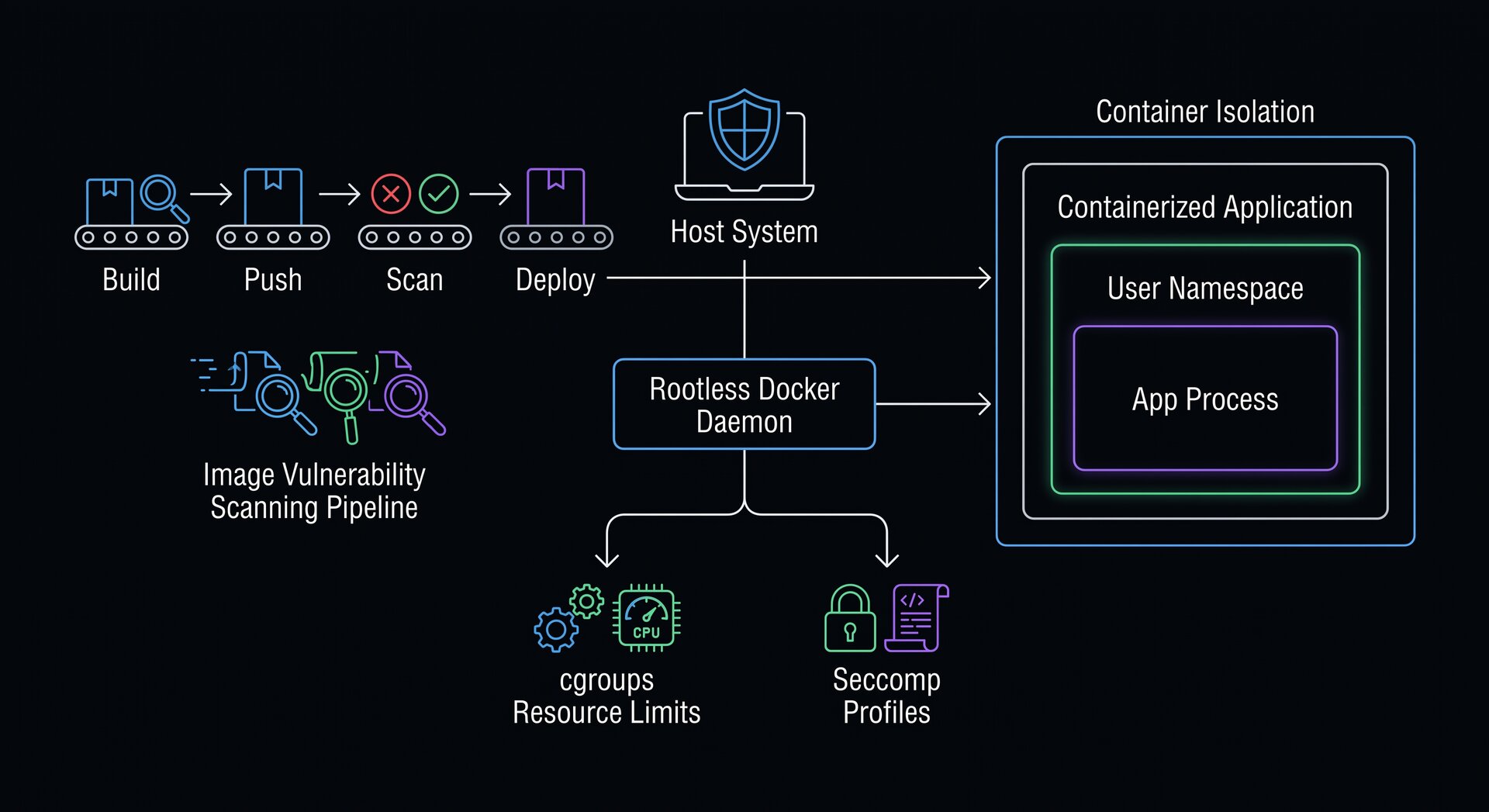
While running containers as non-root users isolates processes inside the container, running the Docker daemon itself in rootless mode completely mitigates host compromise risks. Adopting rootless mode represents an advanced tier of docker container security best practices 2026.
Rootless Docker executes both the daemon and the containers inside a user namespace without root privileges on the host system. Install rootless prerequisites on Ubuntu:
2
dockerd-rootless-setuptool.sh install
Export the user socket environment variables:
2
3
4
export DOCKER_HOST=unix:///run/user/$(id -u)/docker.sock
systemctl --user enable docker
systemctl --user start docker
For advanced service monitoring, background timers, and sandboxing directives for daemon processes, check out our comprehensive Ubuntu systemd service management guide.
In rootless mode, even if an attacker successfully escapes a container, their privileges on the host match those of an unprivileged standard user account, fulfilling core docker container security best practices 2026.
Step 4: Dropping Dangerous Linux Capabilities
By default, Docker grants containers a subset of Linux capabilities (such as
1 | CAP_NET_RAW |
and
1 | CAP_CHOWN |
). Restricting these capabilities is a non-negotiable tenet of docker container security best practices 2026.
The safest approach is dropping all capabilities and re-adding only strictly necessary permissions:
In Docker Compose configurations, enforce capability stripping across all services:
2
3
4
5
6
7
8
9
web:
image: my-service:2026
cap_drop:
- ALL
cap_add:
- NET_BIND_SERVICE
security_opt:
- no-new-privileges:true
The
1 | no-new-privileges:true |
flag prevents processes from elevating permissions using setuid binaries, reinforcing fundamental docker container security best practices 2026.
To ensure the underlying Linux host remains equally protected, make sure to follow our production Ubuntu server hardening guide alongside your container isolation measures.
Step 5: Enforcing Read-Only Root Filesystems
Attackers attempting post-exploitation activities frequently download malware binaries or modify dynamic application files. A highly effective practice in our docker container security best practices 2026 is mounting the container root filesystem in read-only mode.
Run your container with an immutable root filesystem, providing ephemeral tmpfs volumes only where write operations are essential:
For persistent storage, map dedicated Docker volumes with carefully audited permissions rather than mounting sensitive host directories directly.
For more architectural perspectives on modern technology and software setups, explore our guide on evaluating enterprise platforms and architectures, and consult the official Docker Engine Security Documentation for updated engine hardening specifications.
Step 6: Automated Container Image Vulnerability Scanning
Static vulnerabilities in third-party libraries require continuous discovery. Incorporating automated vulnerability scanning into your continuous integration pipeline is a core standard of docker container security best practices 2026.
Utilize Trivy to scan images for known CVEs before deployment:
2
3
4
5
6
7
8
sudo apt-get install wget apt-transport-https gnupg lsb-release -y
wget -qO - https://aquasecurity.github.io/trivy-repo/deb/public.key | gpg --dearmor | sudo tee /usr/share/keyrings/trivy.gpg > /dev/null
echo "deb [signed-by=/usr/share/keyrings/trivy.gpg] https://aquasecurity.github.io/trivy-repo/deb $(lsb_release -sc) main" | sudo tee -a /etc/apt/sources.list.d/trivy.list
sudo apt-get update && sudo apt-get install trivy -y
# Scan image and fail on CRITICAL vulnerabilities
trivy image --severity HIGH,CRITICAL --exit-code 1 my-app:latest
Automated vulnerability scanning ensures compliance with modern docker container security best practices 2026 by preventing high-risk container images from reaching production environments.
Step 7: Resource Limits and DoS Protection
Unbounded containers risk starving neighboring applications of host CPU and memory. An essential guideline in this docker container security best practices 2026 is configuring strict resource constraints (cgroups limits) on every running container.
Establish hard memory and CPU limits directly in container run commands:
Setting
1 | --pids-limit |
provides vital protection against fork bombs and malicious thread exhaustion attacks, reflecting proven docker container security best practices 2026.
Step 8: Protecting the Docker Socket and Network Isolation
Exposing the Docker socket (
1 | /var/run/docker.sock |
) to untrusted containers or unencrypted networks is equivalent to giving root host access. A critical warning in our docker container security best practices 2026 is never mounting the host Docker socket inside production containers.
Implement isolated user-defined bridge networks instead of default bridge or host networks:
2
3
docker network create --driver bridge --internal secure-internal-net
docker network create --driver bridge frontend-net
The
1 | --internal |
flag completely blocks outbound internet access from sensitive database containers, ensuring compliance with strict docker container security best practices 2026.
If you are deploying local artificial intelligence models inside containerized Linux servers, check out our tutorial on how to deploy Ollama models securely on Debian systems, our complete guide on deploying Open-WebUI with Ollama via Docker on Ubuntu, and our tutorial on securing a local AnythingLLM RAG knowledge base on Linux. Also, review the comprehensive guidelines from the CISA Software Supply Chain Security Guidance.
Step 9: Linux Kernel Security Modules – AppArmor and Seccomp Profiles
Deep kernel-level mediation provides an invaluable fallback defense when application code contains unpatched zero-day vulnerabilities. Integrating customized AppArmor and Seccomp profiles constitutes an indispensable pillar of advanced docker container security best practices 2026 in enterprise Linux clusters.
Secure Computing Mode (seccomp) restricts the arbitrary system calls a compromised container can invoke against the host kernel. Docker applies a default seccomp profile that blocks around 44 system calls out of more than 300 (including
1 | reboot |
,
1 | swapon |
, and
1 | sys_chroot |
). For ultra-sensitive workloads, generate an explicit whitelist profile restricting execution strictly to expected system routines:
2
docker run -d --security-opt seccomp=/etc/docker/seccomp-strict.json --name payment-gateway payment-app:2026
Simultaneously, AppArmor confines container processes to specific files, raw network operations, and capability structures. Ubuntu systems maintain native AppArmor profiles for Docker. Verify profile enforcement across running containers:
2
3
sudo aa-status | grep docker
docker inspect --format '{{.AppArmorProfile}}' payment-gateway
Coupling custom AppArmor confinement with strict seccomp filters guarantees that even if malicious actors acquire code execution within a running application, their ability to probe the host kernel remains neutralized.
Step 10: Secrets Management and Credential Hygiene
Hardcoding API keys, TLS certificates, and database connection strings into Dockerfiles or passing them via plaintext environment variables violates core docker container security best practices 2026. Plaintext environment variables are readily exposed via
1 | docker inspect |
and error logs.
Utilize Docker Secrets, HashiCorp Vault, or encrypted volume mounts to supply runtime credentials securely:
2
3
4
5
6
7
8
9
10
11
12
services:
database:
image: postgres:17-alpine
secrets:
- db_password
environment:
POSTGRES_PASSWORD_FILE: /run/secrets/db_password
secrets:
db_password:
file: ./secrets/db_password.txt
For standard single-host Docker deployments, mount secrets via memory-backed tmpfs storage or utilize ephemeral secret injectors, preventing sensitive tokens from ever being committed to persistent container layers or git version control repositories.
Logging, Telemetry, and Anomaly Detection in 2026
Real-time visibility into container runtime behavior is vital for early threat detection. An operational implementation of docker container security best practices 2026 incorporates continuous behavioral monitoring utilizing extended Berkeley Packet Filter (eBPF) tools such as Falco.
Falco evaluates kernel system calls triggered by containers against predefined behavioral rulesets, immediately alerting administrators if unexpected processes spawn inside a web container (for example,
1 | <a class="wpil_keyword_link" href="https://www.howto-do.it/what-is-bash-bourne-again-shell/" title="bash" data-wpil-keyword-link="linked" data-wpil-monitor-id="2033">bash</a> |
spawning under
1 | nginx |
):
2
3
4
5
6
- rule: Shell in Container
desc: Notice when a shell is spawned in an active container
condition: container.id != host and proc.name in (bash, sh, zsh)
output: Shell spawned in container (user=%user.name container_id=%container.id command=%proc.cmdline)
priority: WARNING
Production Container Hardening Checklist
Before moving any containerized service into production in 2026, verify these core standards derived from our docker container security best practices 2026:
- Minimal Base Images: Images built on Distroless or Alpine foundations.
- Non-Root Execution: Processes execute under dedicated non-root UID/GID.
- Capabilities Stripped: Dropped ALL capabilities; retained only minimal operational flags.
- Read-Only Root Filesystem: Immutability enforced with ephemeral tmpfs volumes.
- Resource Limits Configured: Memory, CPU, and PID limits strictly defined.
- Vulnerability Pipeline Active: Automated scanning blocks critical CVEs.
- Socket Protected: No exposure of
1docker.sock
to unprivileged containers.
Conclusion and Continuous Hardening Lifecycle
Applying this comprehensive set of docker container security best practices 2026 ensures that your cloud-native infrastructure remains robust against modern automated intrusion vectors. Security in container environments demands continuous vigilance across source code, container images, daemon settings, and runtime networks. Adhering to the docker container security best practices 2026 outlined in this guide establishes an enterprise-grade defense posture capable of withstanding the sophisticated security challenges of 2026.
- About the Author
- Latest Posts

Mark is a senior content editor at Text-Center.com and has more than 20 years of experience with linux and windows operating systems. He also writes for Biteno.com