Running Local LLMs in Production: Ollama vs. vLLM vs. TGI on Linux (2026 Guide)

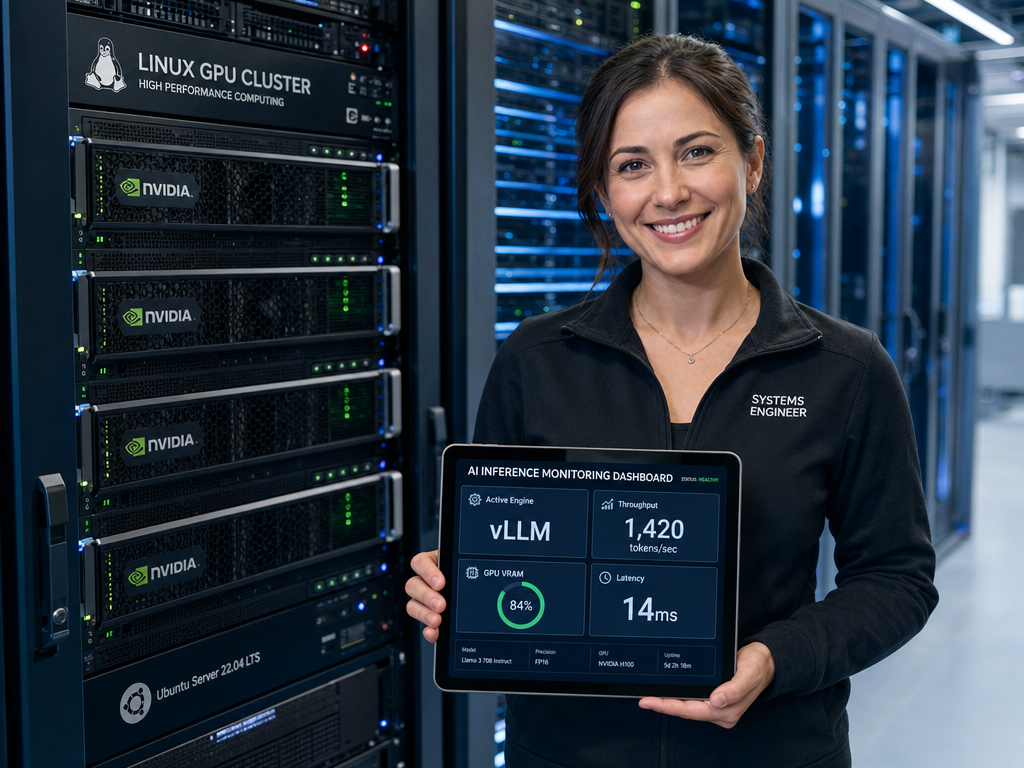
The landscape of self-hosted enterprise artificial intelligence has undergone a fundamental transformation. What began as desktop tinkering with quantized weights has matured into mission-critical, enterprise-grade inference pipelines. Organizations across finance, healthcare, and engineering now run state-of-the-art open models—including Llama 3.3, Mistral Large, Qwen 2.5, and DeepSeek—inside their private clouds and on-premises Linux GPU clusters.
However, moving from a developer workstation running a single query to a production service sustaining concurrent users, autonomous agent swarms, and high-throughput Retrieval-Augmented Generation (RAG) pipelines exposes stark differences between inference runtimes. Choosing the right runtime engine dictates whether your infrastructure achieves thousands of tokens per second with sub-second time-to-first-token, or collapses under GPU Out-Of-Memory (OOM) errors and request queuing.
In this architectural guide, we evaluate the three dominant open-source inference engines for Linux in 2026: Ollama, vLLM, and Hugging Face’s Text Generation Inference (TGI). We dissect continuous batching, PagedAttention, memory management, and multi-GPU tensor parallelism, followed by battle-tested Linux deployment manifests using Docker, Docker Compose, and hardened systemd units.
1. The Anatomy of Modern LLM Inference Bottlenecks
To understand why traditional web serving architectures fail when applied to large language models, systems engineers must understand the two distinct computational phases of autoregressive generation:
- The Prefill (Prompt) Phase: The engine processes the input prompt tokens simultaneously. This phase is predominantly compute-bound (matrix multiplication), saturating GPU Tensor Cores. The primary latency metric here is Time-to-First-Token (TTFT).
- The Decode (Token Generation) Phase: The model generates tokens sequentially, one by one. Each new token requires passing the entire model weights through memory bandwidth while referencing previous tokens. This phase is predominantly memory-bandwidth-bound. The primary latency metric is Inter-Token Latency (ITL) or aggregate throughput (tokens per second).
The KV Cache Bottleneck
During generation, attention keys and values (K and V) for all preceding tokens are preserved in GPU VRAM to avoid redundant recomputations. As context windows expand to 32k, 64k, or 128k tokens, the KV cache grows dynamically, consuming massive amounts of high-speed memory.
Traditional runtime allocators reserve static, contiguous VRAM chunks based on the maximum allowed context length (for example, 8,192 tokens). If an incoming user prompt only requires 400 tokens, the remaining 95% of allocated VRAM remains idle and fragmented—severely throttling concurrent request capacity.
Naive Queuing vs. Continuous (Iteration-Level) Batching
In classical web architectures, requests are batched together at the boundary of processing. If Request A generates 20 tokens and Request B generates 500 tokens, static batching forces the GPU to wait until Request B completes before returning results or accepting new requests.
Modern production engines solve this with continuous batching (iteration-level scheduling). As soon as Request A finishes emitting its final token, its memory is reclaimed, and a newly arrived Request C is injected into the active execution batch at the next decode iteration.
2. Deep Dive: Ollama vs. vLLM vs. TGI
Ollama: The Developer & Edge Specialist
Powered by the robust
1 | llama.cpp |
runtime, Ollama redefined local developer ergonomics. It packages model weights, prompt templates, system instructions, and quantization parameters into standardized Modelfiles. If you haven’t set it up yet, check our dedicated guides on how to install Ollama on Ubuntu 24 and install Ollama on Debian 12. If you want a browser-based chat UI, see our tutorial on setting up Open-WebUI with Ollama on Ubuntu Server, or learn how to build a local RAG knowledge base with AnythingLLM to query private documentation.
- Strengths: Near-zero configuration; single binary download on Linux; native execution on consumer hardware, hybrid CPU/GPU offloading, and Apple Silicon; direct model pulling via the Ollama library; built-in OpenAI-compatible chat endpoint (
1/v1/chat/completions
).
- Architectural Limitations in Production:
- Limited Continuous Batching: While Ollama supports parallel processing via
1OLLAMA_NUM_PARALLEL
, it schedules slots in fixed memory allocations without true PagedAttention memory management.
- No Multi-GPU Tensor Parallelism: Ollama cannot shard a single dense 70B model across multiple GPUs using tensor parallelism; it only supports naive layer pipeline splitting.
- Lack of Automatic Prefix Caching: Large static system prompts (common in autonomous agents and custom Model Context Protocol (MCP) servers) are recalculated frequently.
- Observability: Minimal native Prometheus metrics compared to enterprise inference runtimes.
- Limited Continuous Batching: While Ollama supports parallel processing via
vLLM: The High-Throughput Production Workhorse
Originating from UC Berkeley, vLLM revolutionized LLM serving by introducing PagedAttention, an algorithm inspired by virtual memory paging in operating systems. Instead of allocating contiguous GPU memory for the KV cache, PagedAttention divides the KV cache into fixed-size physical blocks (e.g., 16 tokens per block) that can be scattered across non-contiguous VRAM.
- Near-Zero Memory Waste: PagedAttention reduces memory fragmentation from ~70% down to under 4%, enabling a 2x to 4x surge in concurrency on identical hardware.
- Automatic Prefix Caching (APC): Reuses the KV cache of shared system prompts across diverse user sessions, slashing TTFT for multi-turn dialogues and RAG.
- Production Tensor Parallelism: Shards large models seamlessly across 2, 4, or 8 GPUs with high-speed NCCL communication.
- Quantization Diversity: Native support for FP8, AWQ, GPTQ, SqueezeLLM, and Marlin ultra-fast kernels.
- Speculative Decoding: Accelerates inference by utilizing small draft models to propose candidate tokens verified in parallel by the target model.
- Full OpenAI Compatibility: Drop-in replacement for OpenAI endpoints with full streaming support.
Text Generation Inference (TGI): Hugging Face’s Battle-Tested Stack
Engineered in Rust, Python, and C++, TGI powers Hugging Face’s Inference Endpoints and enterprise deployments globally.
- Rust Web Server: Ultra-fast HTTP and SSE token streaming layer decoupled from the PyTorch inference worker.
- Enterprise Observability: Native OpenTelemetry tracing and comprehensive Prometheus metrics out of the box.
- Production Governance: Native support for grammar-constrained generation (via Outlines), token watermarking, and stop-sequence validation.
- Hardware Adaptability: Supports FlashAttention-2, Paged Attention, and specialized accelerators (such as AWS Inferentia and Habana Gaudi).
3. Comprehensive Evaluation Matrix
The following comparison table highlights the operational capabilities of each engine for production engineering on Linux:
| Evaluation Dimension | Ollama | vLLM | TGI (Hugging Face) |
|---|---|---|---|
| Batching Engine | Slot-based parallel queues; limited continuous scheduling. | Continuous iteration-level batching with dynamic token insertion. | Continuous dynamic batching coordinated via high-speed Rust core. |
| KV Cache Optimization | Static buffer allocation per slot; no virtual paging. | Full PagedAttention + Automatic Prefix Caching (APC). | Paged Attention + FlashAttention-2 memory management. |
| Distributed Multi-GPU | Sequential layer splitting; no true tensor parallelism. | Native Tensor & Pipeline Parallelism via NCCL. | Native Tensor Parallelism via PyTorch distributed & NCCL. |
| Quantization Formats | Primarily GGUF (q4_k_m, q8_0). | FP8, AWQ, GPTQ, Marlin, BitsAndBytes. | FP8, AWQ, GPTQ, EETQ, BitsAndBytes. |
| Observability & Metrics | Basic CLI output and process logs; no native metrics endpoint. | Native /metrics Prometheus scraping (KV cache, QPS, latency). | Native Prometheus endpoint + OpenTelemetry distributed tracing. |
| Primary Production Role | Internal developer tools, CI runners, edge servers. | High-concurrency enterprise APIs, agent swarms, RAG. | Strict enterprise Kubernetes clusters, Hugging Face ecosystem. |
4. Step-by-Step Production Deployment on Linux
Host Prerequisites: NVIDIA Container Toolkit
Before launching containerized GPU workloads on Debian or Ubuntu, ensure you follow Docker container security best practices and configure the official NVIDIA Container Toolkit:
2
3
4
5
nvidia-smi
# Configure repository key and list
curl -fsSL https://nvidia.github.io/libnvidia-container/gpgkey |
2
3
4
5
6
curl -s -L https://nvidia.github.io/libnvidia-container/stable/deb/nvidia-container-toolkit.list | \
sed 's#deb https://#deb [signed-by=/usr/share/keyrings/nvidia-container-toolkit-keyring.gpg] https://#g' | \
sudo tee /etc/apt/sources.list.d/nvidia-container-toolkit.list
# Install toolkit and reload Docker
2
3
sudo nvidia-ctk runtime configure --runtime=docker
sudo systemctl
Production Setup 1: High-Concurrency vLLM with Docker Compose
Deploying vLLM in Docker Compose ensures consistent restarts, resource limits, and health check monitoring. Create
1 | /opt/llm-serving/vllm/docker-compose.yml |
:
2
3
4
5
6
7
8
9
10
11
12
13
14
15
16
17
18
19
20
21
22
23
24
25
26
27
28
29
30
31
32
33
34
vllm-engine:
image: vllm/vllm-openai:v0.7.2
container_name: vllm-production
restart: always
environment:
- HUGGING_FACE_HUB_TOKEN=${HF_TOKEN}
- VLLM_ATTENTION_BACKEND=FLASH_ATTN
ports:
- "8000:8000"
volumes:
- /opt/models/huggingface:/root/.cache/huggingface
ipc: host
deploy:
resources:
reservations:
devices:
- driver: nvidia
count: all
capabilities: [gpu]
command: >
--model meta-llama/Llama-3.3-70B-Instruct
--tensor-parallel-size 2
--max-model-len 16384
--gpu-memory-utilization 0.90
--enable-prefix-caching
--disable-log-requests
--port 8000
healthcheck:
test: ["CMD-SHELL", "curl -f http://localhost:8000/health || exit 1"]
interval: 30s
timeout: 10s
retries: 3
start_period: 120s
Key Configuration Flags Explained:
-
1--tensor-parallel-size 2
: Shards model weights across 2 GPUs using high-speed NCCL.
-
1--gpu-memory-utilization 0.90
: Allocates 90% of GPU VRAM to the model and PagedAttention KV cache pool, reserving 10% for runtime activations.
-
1--enable-prefix-caching
: Reuses KV cache for identical prompt prefixes across distinct requests.
-
1ipc: host
: Enables zero-copy shared memory communication across GPU worker ranks.
Production Setup 2: Hugging Face TGI with Docker
For organizations prioritizing OpenTelemetry instrumentation and Hugging Face ecosystem compatibility, deploy TGI with FlashAttention-2:
2
3
4
5
6
7
8
9
10
11
12
13
14
--name tgi-production \
--gpus all \
--restart always \
--ipc=host \
-p 8080:80 \
-v /opt/models/data:/data \
-e HF_TOKEN="hf_yourSecretTokenHere" \
ghcr.io/huggingface/text-generation-inference:2.4.1 \
--model-id meta-llama/Llama-3.3-70B-Instruct \
--num-shard 2 \
--max-batch-prefill-tokens 4096 \
--max-total-tokens 16384 \
--waiting-served-ratio 1.2
Production Setup 3: Hardened Ollama Daemon on Linux
When running Ollama as an internal background service or auxiliary worker, supervise it via a hardened systemd unit (save as
1 | /etc/systemd/system/ollama.service |
):
2
3
4
5
6
7
8
9
10
11
12
13
14
15
16
17
18
19
20
21
22
23
24
25
26
27
Description=Ollama Production Inference Service
After=network.target nvidia-persistenced.service
[Service]
Type=simple
User=ollama
Group=ollama
WorkingDirectory=/usr/share/ollama
Environment="PATH=/usr/local/sbin:/usr/local/bin:/usr/sbin:/usr/bin:/sbin:/bin"
Environment="OLLAMA_HOST=0.0.0.0:11434"
Environment="OLLAMA_MODELS=/opt/models/ollama"
Environment="OLLAMA_NUM_PARALLEL=4"
Environment="OLLAMA_MAX_LOADED_MODELS=2"
Environment="OLLAMA_KEEP_ALIVE=24h"
ExecStart=/usr/local/bin/ollama serve
Restart=always
RestartSec=3
# Linux Security Hardening
ProtectSystem=full
ProtectHome=read-only
PrivateTmp=true
NoNewPrivileges=true
[Install]
WantedBy=multi-user.target
2
3
sudo systemctl enable --now ollama.service
sudo systemctl status ollama.service
5. Enterprise Production Blueprint: LiteLLM API Gateway
Never expose raw inference ports directly to external applications or client agents. Placing an intelligent routing proxy such as LiteLLM Proxy in front of your vLLM and Ollama instances provides crucial enterprise capabilities:
- Virtual Keys & Quotas: Enforce fine-grained rate limits (requests per minute and tokens per minute) per client team.
- High-Availability Failover: Route production requests to the vLLM GPU cluster, automatically redirecting non-critical queries to auxiliary hosts during maintenance windows.
- Observability & Audit Trails: Stream detailed token usage metrics to Prometheus, Langfuse, or Datadog for transparent cost and latency attribution.
6. Strategic Selection: Which Engine Fits Your Workload?
- Choose vLLM if: You are serving multi-user production applications, autonomous agents, high-concurrency RAG pipelines, or multi-GPU inference clusters demanding maximum token throughput and sub-second TTFT.
- Choose TGI if: You are building in enterprise Kubernetes environments requiring native OpenTelemetry tracing, Hugging Face Hub governance, or specialized inference accelerators.
- Choose Ollama if: You need frictionless developer workstation setup, local testing of quantized GGUF models, edge device deployment, or single-user scripting.
Ready to Scale Your Local AI Infrastructure?
Architecting resilient, high-throughput on-premises AI inference requires precision across GPU driver stacks, memory tuning, and container security. Contact our systems engineering specialists through our Contact Form to plan, benchmark, and deploy dedicated inference infrastructure tailored to your business needs.
- About the Author
- Latest Posts

Mark is a senior content editor at Text-Center.com and has more than 20 years of experience with linux and windows operating systems. He also writes for Biteno.com