
Ubuntu Server Hardening Guide 2026: Complete Production Security Setup

Securing production Linux infrastructure requires a rigorous, multi-layered defensive strategy. In this comprehensive ubuntu server hardening guide 2026, you will discover the exact hardening protocols required to lock down Linux servers against automated brute-force attacks, privilege escalation exploits, and modern zero-day threats in 2026.
Every Internet-facing host encounters automated vulnerability scanning within minutes of provisioning. Deploying default configuration templates leaves critical attack vectors wide open. By systematically implementing this ubuntu server hardening guide 2026, system administrators and DevOps engineers ensure full compliance with modern enterprise security standards, safeguarding sensitive company databases and web applications.
Threat Landscape and Infrastructure Defense in 2026
Modern infrastructure security requires zero-trust architecture principles applied directly at the operating system level. Following an actionable ubuntu server hardening guide 2026 ensures that even if perimeter firewalls or edge routers experience misconfigurations, each independent host maintains impenetrable local defenses.
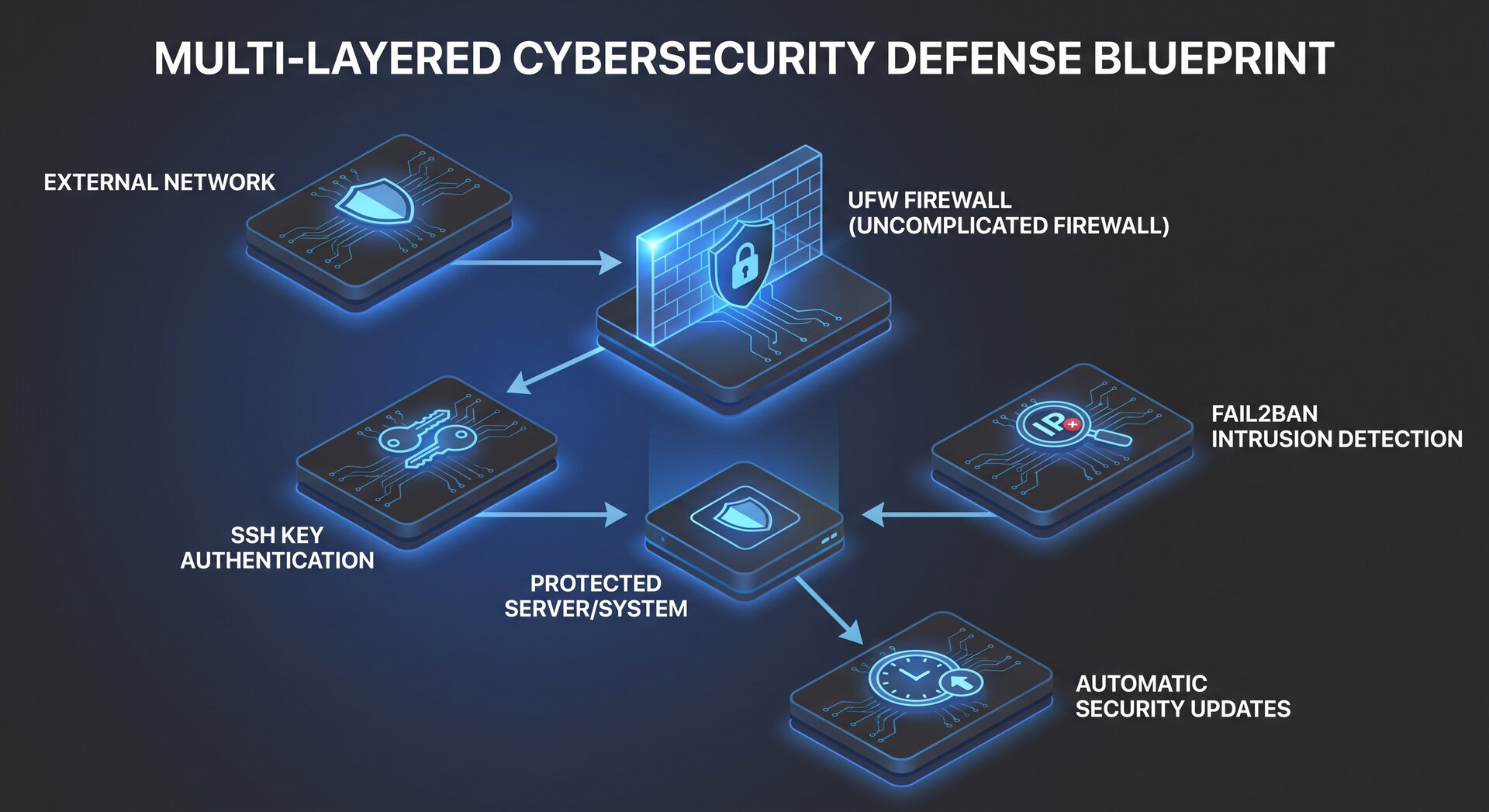
Before modifying core system configurations, understand the foundational layers comprising our defense strategy:
- Identity and Access Management: Eliminating password authentication, enforcing modern ed25519 SSH cryptographic keys, and establishing dedicated non-root administrative accounts with restricted sudo capabilities.
- Host-Level Perimeter Filtering: Configuring Uncomplicated Firewall (UFW) to enforce default-deny incoming policies and restrict management interfaces.
- Automated Intrusion Prevention: Implementing Fail2ban to inspect syslog telemetry and dynamically ban offending IP addresses executing brute-force attacks.
- Kernel Parameter Hardening: Tuning sysctl runtime flags to mitigate SYN floods, disable ICMP redirects, and prevent IP packet spoofing.
- Automated Patch Automation: Guaranteeing timely deployment of critical Linux security fixes without human delay.
Step 1: Initial System Baseline Updates and Repository Hygiene
The first prerequisite outlined in this ubuntu server hardening guide 2026 is establishing clean, verified repository baselines. Freshly deployed cloud instances frequently run outdated kernel images and vulnerable library versions.
Connect to your target node and execute full package index synchronization alongside distribution upgrades:
2
3
sudo apt autoremove --purge -y
sudo apt clean
Verify that your package lists pull strictly from cryptographically signed official repositories. If custom third-party PPAs are present, verify their GPG signatures under
1 | /etc/apt/trusted.gpg.d/ |
or
1 | /etc/apt/keyrings/ |
.
Reboot the host if modern kernel upgrades were applied during the installation:
Step 2: Non-Root Administrative User Provisioning
Direct root logins represent an unnecessary operational risk. An essential principle of any reliable ubuntu server hardening guide 2026 is disabling direct root interactive shell sessions entirely. Instead, assign administrative privileges through authenticated sudo groups.
Create a dedicated administrative user account:
2
sudo usermod -aG sudo sysadmin
Verify that the new account functions correctly before proceeding with SSH restrictions. Switch to the newly created account and verify group memberships:
2
sudo whoami
Step 3: OpenSSH Cryptographic Hardening
OpenSSH remains the primary management interface for Linux servers, making it the highest priority target for remote attackers. A critical section of this ubuntu server hardening guide 2026 focuses on enforcing modern cryptographic ciphers and disabling vulnerable legacy authentication modes.
Generate a robust ed25519 key pair on your local client workstation (for detailed key management, see our step-by-step SSH key-based authentication guide):
Install the public key onto your server node:
Once key-based authentication is verified, configure the server daemon. Edit
1 | /etc/ssh/sshd_config.d/99-hardened.conf |
or the main configuration file:
Insert the following hardened configuration directives:
2
3
4
5
6
7
8
9
10
11
12
13
14
Port 22
PermitRootLogin no
PasswordAuthentication no
ChallengeResponseAuthentication no
UsePAM yes
PubkeyAuthentication yes
X11Forwarding no
MaxAuthTries 3
ClientAliveInterval 300
ClientAliveCountMax 2
AllowAgentForwarding no
AllowTcpForwarding no
AuthenticationMethods publickey
Before restarting the SSH daemon, always validate configuration syntax to prevent accidental administrative lockouts:
Upon receiving zero syntax errors, restart the system service:
For additional details on secure network management and remote tools, consult our comprehensive guide on how workflow automation tools streamline administrative tasks, and refer to the official Ubuntu Security Team Documentation for continuous CVE alerts.
Step 4: Host Firewall Implementation with UFW
Network isolation is non-negotiable. As emphasized throughout this ubuntu server hardening guide 2026, the Uncomplicated Firewall (UFW) provides a robust stateful packet filtering layer over Linux Netfilter.
Establish default filtering policies that drop all unsolicited inbound traffic while allowing outbound connections:
2
sudo ufw default allow outgoing
Explicitly authorize legitimate management and application ports:
2
3
sudo ufw allow 80/tcp comment 'HTTP Web Traffic'
sudo ufw allow 443/tcp comment 'HTTPS Encrypted Traffic'
Enable the firewall and inspect the active rule set:
2
sudo ufw status verbose
UFW automatically updates iptables and nftables structures, providing robust protection against unauthorized port enumeration scans.
Step 5: Automated Brute-Force Defense with Fail2ban
Even with password authentication disabled, internet-wide bots bombard port 22 with connection attempts, consuming server connection sockets. Implementing Fail2ban within this ubuntu server hardening guide 2026 mitigates connection exhaustion.
Install the Fail2ban package and create a local configuration override:
2
3
sudo cp /etc/fail2ban/jail.conf /etc/fail2ban/jail.local
sudo nano /etc/fail2ban/jail.local
Configure defensive thresholds tailored for modern security requirements:
2
3
4
5
6
7
8
9
10
11
12
bantime = 1h
findtime = 10m
maxretry = 5
banaction = ufw
[sshd]
enabled = true
port = ssh
filter = sshd
logpath = /var/log/auth.log
maxretry = 3
Enable and start the daemon:
2
sudo systemctl restart fail2ban
Monitor banned IP addresses and jail health using the command utility:
Step 6: Automated Security Patching with Unattended-Upgrades
Zero-day vulnerabilities and critical library CVEs emerge continuously. Following this ubuntu server hardening guide 2026, configure the operating system to autonomously evaluate and apply security patches without requiring manual intervention. For an extensive breakdown of Livepatch and ESM, consult our automated Ubuntu server security updates guide.
Install and enable the unattended upgrades framework:
2
sudo dpkg-reconfigure --priority=low unattended-upgrades
Fine-tune automatic reboot schedules in
1 | /etc/apt/apt.conf.d/50unattended-upgrades |
:
2
3
4
Unattended-Upgrade::Automatic-Reboot-Time "03:30";
Unattended-Upgrade::Remove-Unused-Kernel-Packages "true";
Unattended-Upgrade::Remove-Unused-Dependencies "true";
Simulate a dry run to verify operational execution:
Step 7: Kernel Runtime Hardening via Sysctl
Hardening the Linux kernel runtime environment is a cornerstone of this ubuntu server hardening guide 2026. Network stack variables can be tuned to reject malicious routing information and mitigate denial-of-service vulnerabilities.
Create a dedicated configuration file at
1 | /etc/sysctl.d/99-security-hardening.conf |
:
Populate the file with production-ready security parameters:
2
3
4
5
6
7
8
9
10
11
12
13
14
15
16
17
18
19
20
21
22
23
24
25
26
27
28
29
30
31
32
33
net.ipv4.conf.default.rp_filter = 1
net.ipv4.conf.all.rp_filter = 1
# Ignore ICMP broadcast requests
net.ipv4.icmp_echo_ignore_broadcasts = 1
# Disable ICMP redirect acceptance
net.ipv4.conf.all.accept_redirects = 0
net.ipv6.conf.all.accept_redirects = 0
net.ipv4.conf.default.accept_redirects = 0
net.ipv6.conf.default.accept_redirects = 0
# Do not send ICMP redirects
net.ipv4.conf.all.send_redirects = 0
net.ipv4.conf.default.send_redirects = 0
# Enable TCP SYN Cookie protection
net.ipv4.tcp_syncookies = 1
net.ipv4.tcp_max_syn_backlog = 2048
net.ipv4.tcp_synack_retries = 2
net.ipv4.tcp_syn_retries = 5
# Log martian packets
net.ipv4.conf.all.log_martians = 1
net.ipv4.icmp_ignore_bogus_error_responses = 1
# Protect against ASLR bypass and memory inspection
kernel.randomize_va_space = 2
fs.protected_hardlinks = 1
fs.protected_symlinks = 1
fs.protected_fifos = 2
fs.protected_regular = 2
Apply the runtime changes immediately without rebooting:
Step 8: Shared Memory and Temporary Filesystem Isolation
Attackers frequently utilize
1 | /dev/shm |
,
1 | /tmp |
, and
1 | /var/tmp |
to stage and execute malicious payloads following web application compromise. As recommended in our ubuntu server hardening guide 2026, isolate these partitions using restrictive mount options.
Edit your filesystem table at
1 | /etc/fstab |
:
Append or update mount options to include
1 | noexec |
,
1 | nosuid |
, and
1 | nodev |
:
2
3
tmpfs /run/shm tmpfs defaults,noexec,nosuid,nodev 0 0
tmpfs /tmp tmpfs defaults,rw,nosuid,nodev,noexec,relatime,size=2G 0 0
Remount filesystems and verify security attributes:
2
mount | grep shm
Step 9: Security Auditing with Lynis and Rootkit Detection
Maintaining security posture requires active auditing. Completing the implementation of this ubuntu server hardening guide 2026 includes installing automated scanning tools to assess compliance.
Install Lynis and RKHunter:
Execute an automated Lynis security audit:
Lynis evaluates hundreds of system attributes, delivering a hardening index score alongside prioritized remediation recommendations. Review warning logs located at
1 | /var/log/lynis.log |
to address application-specific weaknesses.
For organizations deploying containerized workloads or local artificial intelligence tools on Linux servers, review our detailed guide on how to install Ollama on Ubuntu servers safely. Furthermore, explore industry benchmarks defined by the Center for Internet Security (CIS) Benchmarks.
Production Hardening Verification Checklist
Before marking your server ready for production deployment, review this verification checklist derived from our ubuntu server hardening guide 2026:
- Root Login Disabled: Direct SSH root authentication returns access denied.
- SSH Key Authentication Active: Password authentication is globally disabled.
- Firewall Enforced: UFW active with default deny policies on incoming connections.
- Intrusion Defense Active: Fail2ban jail actively inspecting authentication telemetry.
- Kernel Hardened: Sysctl security parameters loaded and active in kernel runtime.
- Automatic Updates Scheduled: Unattended upgrades configured with verified cron execution.
- Temporary Mounts Isolated: Executable flags removed from shared memory mountpoints.
Conclusion and Ongoing Infrastructure Governance
Implementing a comprehensive ubuntu server hardening guide 2026 transforms vulnerable default Linux installations into resilient, battle-hardened operating environments. Security is not a one-time configuration event, but an ongoing governance process involving continuous patch management, log analysis, and configuration auditing. Adhering to the principles in this ubuntu server hardening guide 2026 guarantees that your Linux infrastructure remains resilient against evolving modern threats in 2026 and beyond.
- About the Author
- Latest Posts

Mark is a senior content editor at Text-Center.com and has more than 20 years of experience with linux and windows operating systems. He also writes for Biteno.com